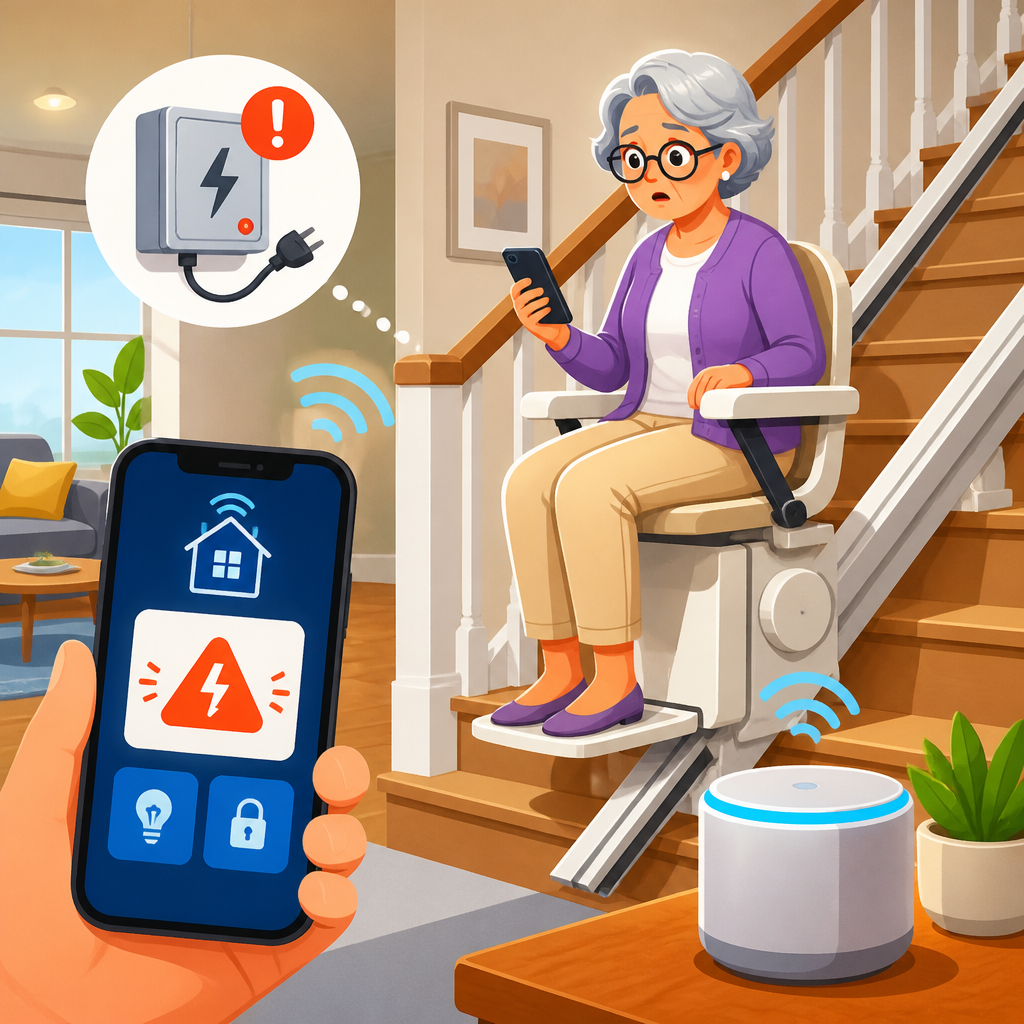
Can a smart home alert you if a stair lift loses power? Yes, but the quality of that alert depends on how the lift is powered, what signals the home can monitor, and whether the system is designed for accessibility rather than generic convenience. In practical terms, a connected home can notify a user, caregiver, or facility manager when a stair lift stops charging, when the outlet feeding it goes dead, when a backup battery starts running low, or when repeated faults suggest a broader electrical issue. That matters because a loss of power is not just an inconvenience. For many users, it can interrupt safe movement between floors, delay medication routines, isolate bedrooms or bathrooms, and create urgent risk during emergencies.
Smart home integration, in this context, means linking a stair lift or its supporting electrical environment to sensors, automations, and communication tools that can detect abnormal conditions and send useful alerts. Power loss can mean several different things: a household outage, a tripped breaker, a switched-off outlet, a failed charger, depleted batteries, or a lift that is parked away from its charging contacts. Those differences matter because the response is different in each case. A robust setup does more than say “something is wrong.” It identifies what likely happened, who needs to know, and what action should come next.
I have worked on home technology projects where families assumed a battery-powered stair lift would keep operating no matter what, only to discover the real weak point was not the motor but the charging path. Most modern stair lifts use rechargeable batteries housed in the carriage, and those batteries charge when the unit is parked at designated points on the rail. During a utility outage, the lift often continues to run for multiple trips, but if charging stops unnoticed for hours or days, range drops and reliability declines. That is why this topic belongs at the center of accessibility planning, not as a gadget add-on.
This hub article covers the full smart home integration landscape for stair lifts: how power systems work, what can be monitored, which devices are reliable, how alerts should be designed for users with mobility or sensory needs, and where the limits are. It also frames the key decisions homeowners, adult children, occupational therapists, installers, and care coordinators need to make when choosing between simple outlet monitoring and deeper whole-home automation. If the goal is to make a stair lift safer and easier to support, the right answer is usually layered monitoring, clear notifications, and fail-safe thinking from the start.
How Stair Lift Power Systems Actually Work
To understand whether a smart home can alert you if a stair lift loses power, start with the hardware. Most residential stair lifts from manufacturers such as Bruno, Handicare, Stannah, and Acorn are battery-operated units that charge from household power. The motor typically runs from onboard batteries, while a charger connected to a standard outlet replenishes those batteries when the lift is parked at a charge point. This design is intentional. It allows operation during short outages and avoids the high current draw of a directly powered motor starting on demand.
That means “power loss” rarely describes only one event. If the home loses electricity entirely, the charger stops but the lift may still function for a period. If the dedicated outlet loses power because of a tripped breaker or unplugged cord, the effect is similar but more localized. If the user leaves the carriage away from its charge contacts, the outlet still has power, yet the batteries slowly drain. If the charger itself fails, external power may be present while the batteries still decline. A useful monitoring plan distinguishes among these scenarios, because false certainty is dangerous.
Some commercial or heavy-duty lifts have different electrical characteristics, and platform lifts or elevators may require more advanced controls, but the same principle applies: monitor the source, the charging status, and the result. The result is whether the lift remains ready for safe use. In accessibility work, readiness matters more than raw electrical data. A homeowner does not need a voltage graph at 2 a.m. They need a message that says the stair lift is not charging and may stop working if not checked soon.
What a Smart Home Can Monitor and Alert On
A smart home can detect stair lift power issues through direct and indirect signals. The simplest method is an energy-monitoring smart plug or a plug-in outage sensor on the receptacle powering the charger. If that outlet goes dead, the system can trigger a push notification, text, phone call, or caregiver alert. More advanced setups use smart electrical panels from brands such as Span, Leviton, or Schneider Electric to track circuit-level status and breaker trips. Whole-home systems can also tell whether the outage is isolated to one branch circuit or part of a broader utility failure.
Indirect monitoring is often just as valuable. A contact sensor can confirm whether the lift is parked at its charging point. A current sensor can show whether the charger is drawing its normal low load. A battery or fault indicator from the lift itself, if exposed through dry contacts or a manufacturer-approved interface, can feed a home automation platform such as Home Assistant, Control4, or Crestron. In larger properties or assisted living settings, these signals can be routed into a supervised monitoring environment rather than a casual smartphone app.
The most effective alerts are specific. Instead of a generic “stair lift issue,” a system should say: utility power lost, stair lift charger outlet off, lift not parked on charge point, charger draw abnormal, or backup battery low. These are actionable states. They reduce panic and speed troubleshooting. They also support escalation. If the user does not acknowledge the first message, the system can notify a family member, neighbor, or staff contact. In practice, that escalation path is the difference between a clever automation and a meaningful accessibility safeguard.
Best Integration Approaches for Reliable Monitoring
There is no single best architecture for every home. The right approach depends on the user’s mobility, the number of caregivers involved, internet reliability, and whether the property already has a mature automation system. In homes where simplicity matters most, I usually recommend starting with power monitoring at the stair lift outlet, plus a whole-home outage alert and a routine battery check. That covers the most common failures with minimal complexity. In homes with active caregiving or remote oversight, deeper integration makes sense.
| Integration approach | What it monitors | Best use case | Main limitation |
|---|---|---|---|
| Smart plug with power sensing | Outlet status and charger consumption | Single-user home needing simple alerts | May not distinguish charger fault from lift parking issue |
| Circuit-level smart panel | Breaker state, branch power, whole-home outages | Renovations or newer connected homes | Higher cost and professional installation |
| Automation hub with sensors | Power, parking position, occupancy, escalation rules | Caregiver-supported households | Requires careful configuration and maintenance |
| Manufacturer-approved dry contact or interface | Native fault, charge, or status outputs | High-reliability accessibility projects | Availability varies by brand and model |
For many households, Home Assistant is the most flexible platform because it can combine smart plugs, UPS reporting, internet status, and messaging services into one logic chain. For professionally maintained systems, Control4 and Crestron offer stronger integrator support and cleaner user interfaces, especially when the home already includes monitored lighting, shades, door access, and emergency calling. The key is not brand loyalty. It is building redundancy. If internet service fails during a power event, cloud-only alerts may never arrive. Local automations with cellular backup are substantially more dependable.
Designing Alerts That Are Actually Useful
An alert only helps if the right person notices it and understands what to do. Accessibility-focused alert design should account for hearing loss, low vision, cognitive load, and caregiver workflows. That means using multiple channels: audible announcements through smart speakers, large-screen visual notices on tablets or wall panels, vibration or haptic alerts on mobile devices, and text or voice calls for off-site contacts. Time of day also matters. Overnight alerts may need to bypass silent modes if the user depends on the lift for bathroom access or evacuation.
Message content should be plain, short, and specific. A good alert says, “Stair lift charger outlet lost power at 8:12 p.m. Lift may still operate on battery. Check breaker panel or utility outage.” A better one adds context, such as estimated battery reserve based on known behavior, although estimates should be conservative. Avoid technical jargon unless the audience is a trained facility manager. In homes I have assessed, the biggest failure was not lack of sensors but confusing notifications that left families unsure whether to act immediately or wait until morning.
Escalation rules should reflect real life. If a user acknowledges the alert on a bedroom tablet, no further action may be needed. If there is no acknowledgment in fifteen minutes, notify a caregiver. If the home also reports a prolonged outage and the stair lift user is alone upstairs, trigger a welfare check. That kind of logic turns monitoring into risk management. It also keeps false alarms from causing alert fatigue, which is one of the fastest ways to make a safety system ignored.
Limitations, Safety Boundaries, and Installation Standards
Smart home integration improves awareness, but it does not replace proper stair lift installation, routine maintenance, or manufacturer guidance. Many lifts are certified to recognized standards such as ASME A18.1 in the United States, and any electrical work should follow the National Electrical Code and local requirements. Installers should confirm whether the lift needs a dedicated circuit, whether the outlet location is protected from accidental unplugging, and whether adding monitoring devices affects warranty terms. That last point matters. Not every manufacturer approves every accessory, especially low-quality consumer smart plugs.
There are also technical boundaries. A plug-based monitor can tell you the charger lost power, but it may not know whether the batteries remain healthy. A battery-powered internet router may keep the smart home online during a brief outage, but if the modem, gateway, or cellular backup fails, remote alerts can stop. Wireless sensors can drop off the network in large homes with poor mesh coverage. For these reasons, I recommend treating stair lift power alerts as one layer in a broader accessibility plan that includes preventive maintenance, manual contingency steps, and family communication.
Testing is essential. After installation, simulate the likely failure modes: unplug the charger, trip the circuit under controlled conditions, leave the lift off the charging point, and confirm who receives alerts and how fast. Repeat those tests after software updates, internet changes, or battery replacements. In accessibility projects, reliability is a process, not a purchase. A smart home can absolutely alert you if a stair lift loses power, but only if the integration is engineered, documented, and reviewed like a safety function.
The central lesson is straightforward: a smart home can alert you when a stair lift loses power, but the best systems do more than detect a blackout. They monitor the charger outlet, the branch circuit, the lift’s charging behavior, the user’s ability to receive alerts, and the caregiver path when the first message is missed. That layered approach is what turns home automation into a practical accessibility tool. It protects mobility, reduces uncertainty, and helps families respond before a routine power problem becomes a serious barrier between floors.
For anyone building or upgrading a connected accessibility plan, start with the basics and add depth where risk is higher. Confirm how your stair lift is powered. Ask the manufacturer or installer what fault outputs or approved accessories are available. Add reliable outlet or circuit monitoring, choose an automation platform that can send redundant notifications, and test the full chain under real conditions. If the home supports an older adult or anyone with limited mobility, those steps deliver a clear benefit: the lift remains visible, supportable, and less likely to fail silently when it is needed most.
This page serves as the hub for smart home integration within accessibility and mobility solutions because power alerts are only one part of the larger picture. The same planning framework applies to door access, lighting scenes, voice control, emergency calling, environmental sensors, and remote caregiver visibility. If you are evaluating your own setup, use this topic as a roadmap. Review the lift, the electrical path, the network, the alert recipients, and the backup plan. Then make one improvement at a time, document it clearly, and test it. That is how smart home technology becomes dependable support instead of decorative convenience.
Frequently Asked Questions
Can a smart home actually alert someone if a stair lift loses power?
Yes, in many cases a smart home can alert a user, caregiver, or building manager if a stair lift loses power, but the reliability of that alert depends on what the system is monitoring. A stair lift itself may not always transmit a direct “power lost” message unless it is designed with connected diagnostics or integrated monitoring. More commonly, a smart home setup watches related events such as loss of power at the outlet, interruption of the charger, changes in battery status, or recurring fault signals that indicate the lift is no longer receiving normal electrical supply.
That distinction matters because “power loss” can mean several different things. The home’s main electricity could fail, a specific circuit breaker could trip, the lift’s plug could come loose, the charger could stop working, or the stair lift could continue operating temporarily on battery even though charging has stopped. A well-planned smart home system can detect one or more of those conditions and send alerts by text, app notification, email, or even automated calls. In accessibility-focused environments, those alerts are often routed to multiple people so a missed message does not become a safety issue.
The most effective systems are built around the actual use case: protecting someone who depends on the stair lift for daily mobility. That means the alert should be timely, specific, and actionable. Instead of a vague message about a smart plug going offline, a better notification would explain that the stair lift charger has lost power and the unit may be running on backup battery. That kind of setup turns a generic smart home into a practical safety layer.
What types of power-related problems can a smart home monitor for a stair lift?
A smart home can potentially monitor several different power-related issues, and each one tells a slightly different story. The most basic condition is whether the outlet supplying the stair lift charger still has electricity. If that outlet goes dead, a connected power monitor, energy sensor, or supervised smart device may flag the outage. Another common condition is whether the charger is actively drawing power. If the lift normally charges whenever it is parked at a certain point on the rail, a sudden change in charging behavior can suggest the charger has failed, the lift is parked incorrectly, or power to the charging contacts has been interrupted.
Battery condition is another important category. Many modern stair lifts use batteries so they can continue operating during short outages, but that does not eliminate the need for alerts. In fact, battery-backed lifts create a second risk: a user may not realize the lift is no longer charging until the batteries become depleted. If the system can monitor battery health, low-battery warnings, charging cycles, or repeated discharge events, it can notify someone before the lift becomes unusable.
Smart monitoring can also help identify patterns that point to a broader electrical problem rather than a one-time interruption. For example, repeated charger dropouts, multiple low-voltage warnings, or recurring resets on the same circuit may indicate an unstable outlet, aging wiring, a failing charger, or nuisance breaker trips. In larger homes, senior living settings, or multi-user environments, that trend data can be just as valuable as a single instant alert because it helps catch a developing issue before it becomes an emergency.
What a system cannot do automatically is assume every fault means the same thing. A “no power” event, a “not charging” event, and a “low battery” event are related, but they are not identical. The better the monitoring design, the more clearly the alert can separate those conditions and guide the right response.
Will a stair lift still work during a power outage, and can a smart home warn you before it stops?
In many homes, yes. Most modern stair lifts are battery-powered units that charge from household electricity, which means they can usually continue to run for a period of time during a power outage. That is one of the key safety advantages of battery-backed designs. However, the lift’s ability to keep running depends on battery age, charge level, manufacturer specifications, frequency of use during the outage, and whether the batteries were healthy before the power interruption began.
This is where smart home alerts can be especially useful. If the house loses power or the stair lift’s charging circuit goes offline, an alert can be sent immediately so the user or caregiver knows the lift is now relying on stored battery power. A second alert can be triggered if the outage continues long enough for the backup battery to drop to a concerning level. That gives people time to adjust plans, reduce nonessential trips, or arrange assistance before the lift becomes unavailable.
It is important to understand, though, that warning systems need their own resiliency. If the home Wi-Fi, internet connection, or smart hub goes down as soon as power fails, the alert may never leave the house unless the system includes battery backup, cellular communication, or a dedicated accessibility monitoring platform. For a person who depends on the lift, that redundancy matters. A good design does not just monitor the stair lift; it also protects the alert path itself.
In practical terms, the best answer is that a smart home can absolutely provide advance warning, but only if the overall system is engineered with outages in mind. If the notification depends on devices that all shut off at the same moment the power fails, the setup may look impressive on paper while offering very little real protection.
What is the best way to set up reliable alerts for stair lift power loss?
The best setup starts with identifying the most meaningful signals rather than relying on a single consumer smart device. For many homes, a layered approach works best: monitor the outlet or circuit feeding the stair lift charger, track whether the lift is actually charging when parked, watch for low-battery or fault conditions if the lift supports that kind of reporting, and send alerts to more than one person. This creates overlap so that if one signal is missed, another may still reveal the problem.
Reliability also improves when the equipment is chosen with accessibility and supervision in mind. A generic smart plug may be useful for basic power awareness, but it may not be enough by itself because it does not always distinguish between outlet failure, Wi-Fi loss, intentional unplugging, or a malfunction in the plug itself. A more robust design might include a monitored power sensor, a battery-backed hub, cellular failover, or integration with a home security or remote care platform that supervises device status continuously.
Notification design matters too. Alerts should go to the right people, in the right order, with clear language. For example, a first message might go to the user and caregiver when charging stops unexpectedly. If the issue is not acknowledged within a defined time, the system could escalate to another family member, a maintenance contact, or facility staff. This is especially important in households where the stair lift is not used constantly and a charging problem could go unnoticed for hours or days.
Finally, any system should be tested routinely. Simulated power loss, charger disconnection, and communication backup checks can reveal weaknesses before a real event occurs. That is often the difference between a gadget-based setup and a dependable support system. For something tied to mobility and safety, a planned, tested, multi-layer alert strategy is the strongest approach.
Are there any limitations or safety concerns when using smart home technology to monitor a stair lift?
Yes, and it is wise to treat smart home monitoring as a safety enhancement, not the sole line of protection. The biggest limitation is that many smart home products are built for convenience rather than medical accessibility. They can tell you that a device went offline, but they may not explain whether the cause was a dead outlet, an internet issue, a drained battery backup, a charger fault, or simple loss of wireless connection. If the wording of the alert is confusing, the response may be delayed.
Another concern is compatibility. Stair lifts are specialized mobility devices, and not all manufacturers support third-party monitoring or want their systems modified. Any solution should avoid interfering with the lift’s operation, electrical safety, warranty terms, or service requirements. In most cases, passive monitoring of power supply, charging behavior, or manufacturer-approved status outputs is safer than trying to alter the lift’s controls.
False alarms and missed alarms are also real issues. A system that sends too many unnecessary notifications may get ignored, while a system that depends on fragile internet connectivity may fail silently when it is needed most. That is why redundancy, supervision, and regular testing are so important. If the user depends heavily on the stair lift, it may be worth pairing smart home tools with a professionally monitored solution or a dedicated care notification platform.
Most importantly, no alert system replaces emergency planning. Households should still have a backup plan for how the user will move safely if the stair lift becomes unavailable, especially during extended outages. Smart home technology can provide valuable early warning and better visibility into charger, outlet, battery, and fault conditions, but its role is strongest when it supports a broader accessibility and safety strategy rather than standing alone.